
In today’s digital world, having a website is just the beginning. To reach the right audience and grow your online presence, understanding how your site appears in Google search results is essential. Google Search Console offers website owners valuable insights that can guide smart decisions and help improve search performance.
This article explores what Google Search Console is, why it is important, and how it can help your website thrive, complementing a solid SEO strategy to boost your site’s visibility.
1.
What Is Google Search Console?
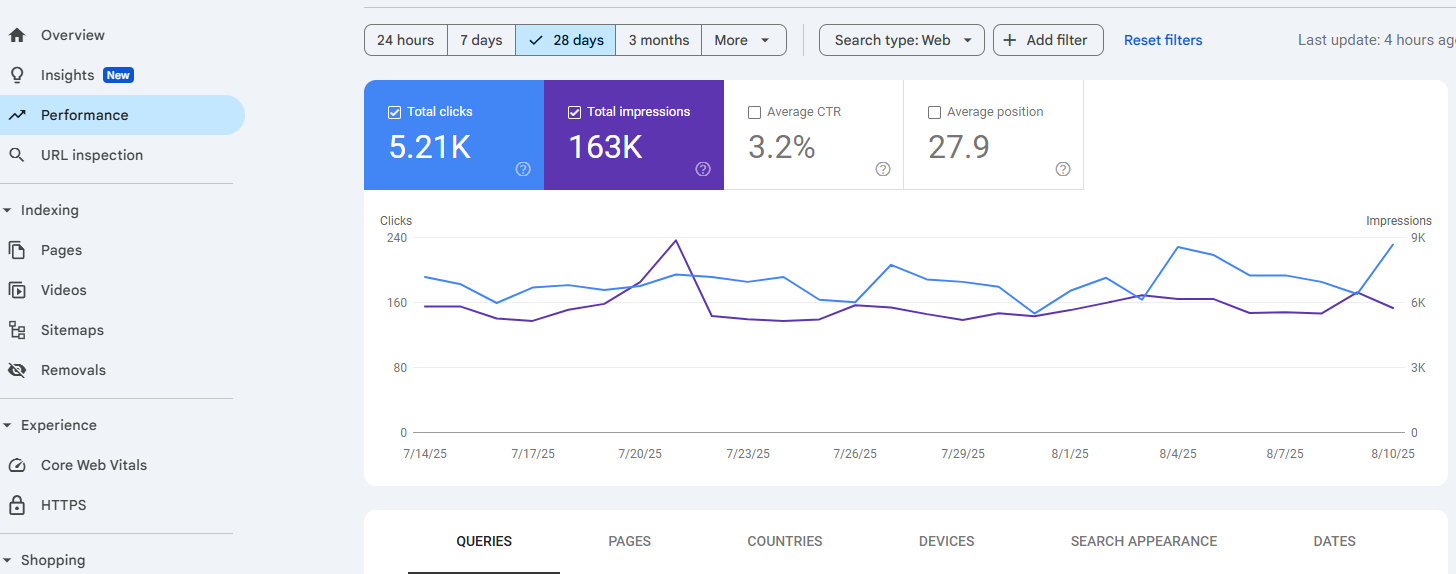
Google Search Console is a free service from Google that helps website owners understand how their website performs in Google search results. It provides insights on how Google views your site, what keywords bring visitors, and how well your pages rank in search.
This tool is useful for all types of websites, from small business sites to blogs and online stores. It shows you what is working well and what might need attention.
2.
Key Features of Google Search Console
- Impressions: The number of times your website pages appear in Google search results for different queries.
- Top Queries: The search terms that bring the most traffic or impressions to your site.
- Top Pages: The pages on your site that get the most clicks and impressions from search results.
- Click Through Rate (CTR): The percentage of impressions that resulted in clicks.
- Average Position: The average rank of your pages in search results for specific queries.
- Index Coverage: Which pages are indexed, and details on errors or warnings affecting indexing.
- Mobile Usability: Reports on how well your site works on mobile devices.
- Security Issues: Alerts about malware, hacked content, or other security problems.
- Manual Actions: Notifications if Google applies penalties to your site for violating guidelines.
- Sitemaps: Submission and status of your XML sitemaps.
- Core Web Vitals: Metrics related to page speed and user experience.
3.
Google Search Console vs Google Analytics
Google Search Console and Google Analytics are both important tools but focus on different aspects of your website. Google Search Console provides data on how your site performs in Google search results. It provides data on search queries, how often your pages show up, clicks, and average ranking. It also highlights technical and security issues that may affect your site’s visibility.
Google Analytics focuses on what visitors do after arriving on your site. It tracks which pages they visit, how long they stay, their actions, and where they come from. It also gives insights into user demographics and behavior.
Using both tools together gives a complete picture: Google Search Console explains how visitors find your site, and Google Analytics shows what they do once there.
4.
Why Google Search Console Matters for Your Website
Google Search Console is a vital tool that provides direct insight from Google about how your website is discovered and shown in search results. Without access to this information, decisions about improving your site’s visibility and content are mostly based on guesswork.
This tool reveals which search queries bring visitors to your site, how often your pages appear in search results, how many clicks those pages receive, and the average position for specific keywords. With this data, it becomes easier to focus on the pages and content that truly attract visitors.
Google Search Console also highlights technical problems that can prevent pages from being indexed or displayed in search results. It alerts site owners to security concerns and reports on mobile usability and website performance, pointing out issues that can affect user experience and traffic. Monitoring these factors over time helps measure the impact of updates or fixes made to the site.
For any business that relies on attracting visitors through search engines, Google Search Console transforms complex data into clear, actionable steps to improve visibility and website performance.
5.
Optimize Search Queries with Google Search Console (Example)
You may wonder how to put all the data from Google Search Console into practical use. Here is a simple example to show how this insight can help improve your website’s performance.
Imagine a local bakery with a website that wants to attract more visitors searching for “gluten-free cupcakes.” Using Google Search Console, they find that this search term appears frequently in their site’s search results data. The report shows the site appears about 800 times a month for this query but only receives 15 clicks. This low click-through rate suggests people see the listing but are not choosing to visit the site.
With this knowledge, the bakery updates their page title and meta description to better match what users searching for gluten-free cupcakes want to see. They highlight unique selling points like “freshly baked daily” and “made with organic ingredients” to make the listing more appealing. Over time, Google Search Console shows progress: impressions remain strong, clicks increase, and overall engagement improves.
By paying attention to this kind of data and making targeted changes, website owners can make their sites more attractive to searchers. This is just one example of how GSC can help determine what to update on your website.
Final Thoughts
Google Search Console is a valuable tool for anyone who wants to improve how their website performs in Google search results. It shows you how people find your site, which search terms bring visitors, and where you can make improvements. Using this information to update page titles, meta descriptions, and content helps website owners boost visibility, attract more visitors, and grow their online presence. The tool also offers powerful filters that let you dive deeper into your data, helping you analyze performance by page, query, device, and more.
This blog only scratches the surface of what Google Search Console can do, but exploring it further can unlock even greater opportunities to optimize your site and grow your business.